Bienvenue sur la documentation de Geotrek-admin !
🏞️ About Geotrek (fr)
Discover Geotrek’s main features and ecosystem.
Components & profiles
Community & governance
Open-source stack
🚀 User manual (fr)
Step-by-step guide for all users.
Modules & views
Data & media
API & menus
💡 Tutorials (fr)
Hands-on guides to learn by doing.
QGIS connection
Basemaps setup
Fix topology
🔧 Installation
Set up and adapt Geotrek.
Ubuntu install
Backup & restore
Config & users
Maintenance
⚙️ Advanced config
Fine-tune Geotrek’s settings.
Maps & APIs
UI & PDF
Mobile sync
🗃️ Import data
Import, update, and manage data.
Import data
Touristic data systems
Aggregator
✨ Contribute
Improve Geotrek together.
Code & docs
Translations
Guidelines
📝 Others
Tips, fixes, and credits.
Troubleshooting
Authors
Changelog
Geotrek-admin is a web application designed to manage, centralize, and structure geographical and touristic information for your territory. It is the back-office application of the Geotrek ecosystem.
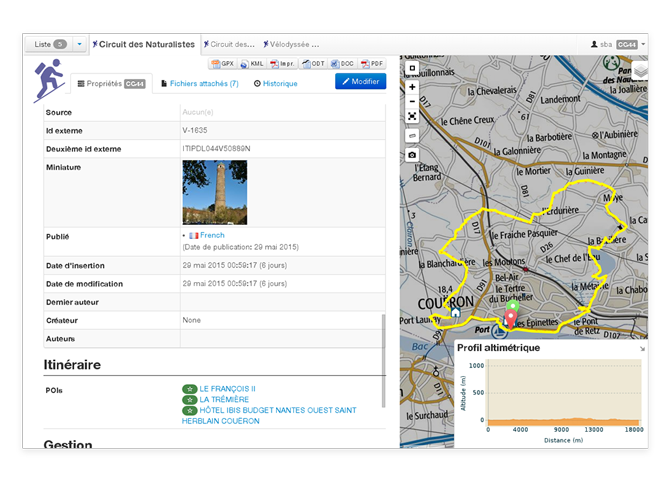
With Geotrek-admin, you can:
Manage treks, touristic information, and related content (media, descriptions, etc.).
Organize your data with maps, layers, and metadata.
Export content to various public interfaces, such as Geotrek-rando or printed topoguides.
You can explore Geotrek-admin in action through the demonstration website:
https://demo-admin.geotrek.fr/ (demo / demo)
Geotrek-admin is built on Django and leverages a PostGIS database for handling geographical data. It serves as the data source for Geotrek-rando, Geotrek-widget, and other tools of the Geotrek ecosystem.
Voir aussi
Learn more about Geotrek-admin in the general documentation (french).